

What Is Click-To-Call?
A click-to-call widget is a button — usually floating in a corner of a website or embedded in a page — that lets a visitor start a phone call the moment they click it, without dialing a number themselves. On desktop, this typically triggers a browser-based call using WebRTC technology; on mobile, it can also use the tel: protocol to open the visitor's native phone dialer automatically.
The mechanics are simple, but the effect on conversion is significant. Instead of a visitor:
- Searching the page for a phone number,
- Copying it,
- Switching to their phone app,
- Dialing manually,
...they just click, and the call connects — either straight to your team or through a widget-hosted interface in the browser itself.
Most modern click-to-call widgets also do more than just connect the call. They typically include:
- Call routing based on time of day, department, or visitor location.
- CRM integration, so every call is logged automatically against the visitor's record.
- Analytics, tracking which pages and campaigns actually generate calls.
- Mobile optimization, since a large share of website traffic — and nearly all click-to-call usage — happens on phones already set up to make calls instantly.
The core value is friction removal. Every extra step between "interested" and "connected" is a chance for a visitor to change their mind or get distracted. Click-to-call collapses that gap to a single tap.
How Does It Beat Forms?
Contact forms have been the default lead-capture tool for years, but they were never designed for visitors with urgent, high-intent questions — they were designed for visitors willing to wait.
Here's where click-to-call consistently outperforms a standard contact form:
- Immediacy. A form submission usually means a wait — minutes, hours, sometimes a full business day — before anyone responds. A click-to-call widget connects the visitor in seconds, while their intent is still at its peak.
- Lower abandonment. Forms ask visitors to type out their name, contact details, and often a message, all before they know if anyone will actually respond. A call button asks for nothing but a click.
- Mobile-first behavior. Most website visitors are on their phones already. Typing a multi-field form on a small screen is far more friction than tapping a call button that opens a dialer they already know how to use.
- Real conversation over static text. A form captures what a visitor is willing to write down. A call captures what they'd actually say — tone, urgency, and nuance that a text box strips away.
The tradeoff has traditionally been staffing: someone has to be available to actually answer every call a widget generates, or the advantage disappears the moment a call goes unanswered. This is exactly the gap AI voice agents are now closing. Callveriq's guide on voicebot lead generation for real-time visitor conversion breaks down how browser-based voice AI captures and qualifies these visitors without needing a rep standing by for every click.
Compare click-to-call vs forms
This blog is just the start.
Unlock the power of Callveriq’s AI with a live demo.

AI Widget Or Basic Widget?
Not all click-to-call widgets do the same job. A basic widget is a connector — it links the visitor to a person or a phone number and nothing more. An AI voice widget adds a layer of intelligence on top of that connection, so the first interaction isn't just "the call rang," but an actual conversation that starts qualifying the visitor immediately.
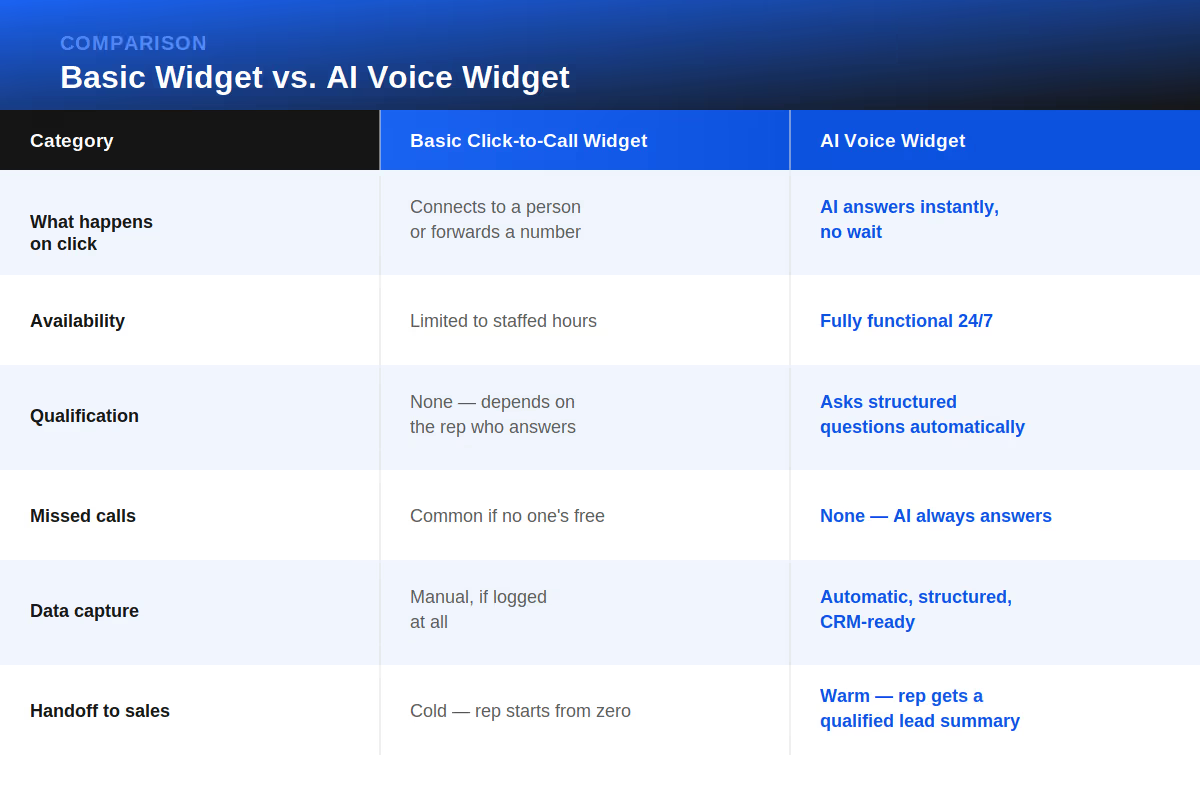
A basic widget solves the friction problem: it makes calling easier. An AI voice widget solves the friction problem and the qualification problem — it makes sure that every call, whenever it happens, results in a structured, sales-ready lead rather than just a connected line. Callveriq's overview of AI website widgets for capturing and qualifying visitors shows what this looks like in practice, walking through how a widget can ask short qualifying questions and generate a structured summary before a rep even picks up.
See AI widgets vs basic widgets
How Do You Qualify Visitors?
Getting a visitor to click "Call Now" is only half the job. The other half is making sure that call actually turns into a qualified lead instead of just a conversation that goes nowhere. For B2C businesses, this usually comes down to a few practical steps:
- Answer instantly, every time. Any delay — even a short hold — undoes the advantage click-to-call was supposed to create. AI voice agents make this possible without needing a rep on standby around the clock.
- Ask the right questions upfront. Budget, timeline, service needed, location — whatever your team needs to know before following up should be captured in the first conversation, not chased down afterward.
- Score and route based on intent. Not every caller is ready to buy right now. High-intent callers should be routed to a live rep immediately; lower-intent ones can go into a nurture flow instead of tying up sales time.
- Sync everything to the CRM automatically. A qualified lead that isn't logged anywhere is still a lost lead. Structured, automatic CRM entry ensures follow-up actually happens.
- Follow up fast on anything that doesn't convert live. Not every visitor will complete a call. Missed or dropped calls should trigger an automatic callback or text follow-up rather than disappearing entirely.
The businesses that get the most out of click-to-call treat the widget as the start of a qualification process, not the end of one. Callveriq's piece on AI for home services and never missing a call, text, or request illustrates this end-to-end flow — from a visitor landing on the site to a job actually getting booked — which is the same logic B2C teams in other industries can apply to their own qualification process.
Start qualifying visitors automatically
Bottom Line
Click-to-call exists because friction kills intent; the longer it takes a visitor to reach a real person, the more likely they are to leave without ever becoming a lead. A basic widget solves half of that problem by making the call itself effortless. Pairing it with an AI voice agent solves the other half, making sure every single call — no matter when it happens — turns into a structured, qualified lead instead of just a connected line. For B2C businesses where website visitors arrive with real, timely intent, that shift from "easier to call" to "every call is worked" is what actually turns traffic into revenue.
FAQs
1. Does click-to-call work on both desktop and mobile?
Yes — desktop typically uses browser-based WebRTC calling, while mobile can also trigger the native phone dialer directly.
2. Do I need a special phone system to add a click-to-call widget?
No — most widgets work through your existing number or a virtual number, with no new hardware required.
3. Will an AI voice widget replace my sales team?
No — it qualifies and routes visitors so your team only spends time on calls that are actually worth taking.
4. Can click-to-call widgets track which pages generate the most calls?
Yes — most widgets include analytics that show which pages, campaigns, or channels drive call volume.
5. What happens if a visitor calls after hours?
With a basic widget, the call typically goes unanswered; an AI voice widget can still answer, qualify, and log the lead 24/7.