

But what if we told you that you could bring out the best from everything seamlessly and achieve increased sales by 21% and CSAT scores by 27%? Not kidding.
“A study by Mckinsey reveals that 60% of the respondents at companies with integrated digital and IT operations say their companies’ investments in technology create business value”.
In simpler words, integrate Callveriq's call-monitoring software into your existing tech stack!
Show Me How Callveriq’s Integrations Boost Sales and CSAT
The goal of integrating Callveriq with your existing tech-stack is to improve the contact center's efficiency and effectiveness. Provide a better experience for both customers and employees.
Also, integration with Callveriq means gathering insights from conversations to 3X your contact center performance. More on this in the next segment!
Listen to our Podcast on How to build an ideal sales tech stack?
Why Should You Integrate Callveriq’s Call Monitoring Software Into Your Existing Tech-Stack?
Can you identify some challenges that might still be prevalent with your existing tech-stack integration? Some of them are listed below -
- Agents fail to follow call script
- Poor customer experience
- Lack of data and insights
- Difficulty adapting to change
- Longer ROI cycle
- Not achieving 100% Call QA
On the other hand, Callveriq’s AI-backed contact center software uses conversation intelligence that brings an improved outlook to these problems and makes operations way easier. Let’s discuss the benefits of integrating your tech-stack with Callveriq.
- Improved efficiency: By integrating Callveriq with your existing tech-stack, your call center can streamline its processes and reduce the time and effort required to handle calls and resolve customer issues.
- Enhanced customer experience: Teck-stack integration with Callveriq allows a call center to access and utilize customer information from various sources, which can be used to personalize the customer experience and improve customer satisfaction by 27%.
- Better data management: Integration with Callveriq can help a call center to better manage and analyze customer data from conversations through omnichannel platforms that include voice calls, chats, and emails, which can be used to drive more sales and make informed business decisions.
- Boost agent performance: When it comes to contact center performance, agent performance plays an integral role in its uptick. But executing and tracking agent performance can be a bit tricky. With Callveriq’s 100% QA and 100% compliance monitoring, you won’t be snowed under creating multiple manual reports and analyses.
The benefits, you may ask?
Achieving an improved agent performance paves the way to multiple results like increased call center performance, greater CSAT, lower attrition rates, and an increased ROI in your contact center.
What Are The Native Integrations Of Callveriq?
Callveriq ensure that integration is as smooth as possible. While Callveriq allows you to integrate any software into your tech-stack as per requirement, some native integrations can be activated with just a single click.
Here’s a list of all the native integrations under Callveriq -
1. Team Messaging
Integrate with team messaging tools with just one click and get custom notifications, summaries, and reports on individual channels and groups. You can also schedule and share custom reports on the integrated team messaging tools.
Team messaging tools that can be integrated with Callveriq:
2. Video Conferencing
Allows your agents to drop the pen and focus completely on the customer calls while Callveriq records the calls, analyzes, and draws insights.
Video conferencing tools that can be integrated with Callveriq:
3. Calendar
Integrate Callveriq to set up an automatic recording system for all your meetings. Never miss a meeting and, for that matter, any insightful information.
Calendar tools that can be integrated with Callveriq:

4. Dialer
Use recorded, transcribed, and analyzed conversations by Callveriq by integrating it with your telephony system.
Some dialer tools that can be integrated with Callveriq:
5. CRM
Don’t just manage customer data but also fetch numerous insights from the conversations.
CRMs that can be integrated with Callveriq:
This blog is just the start.
Unlock the power of Callveriq’s AI with a live demo.

How Do The Native Integrations Of Callveriq Work?
Customer Relationship Management
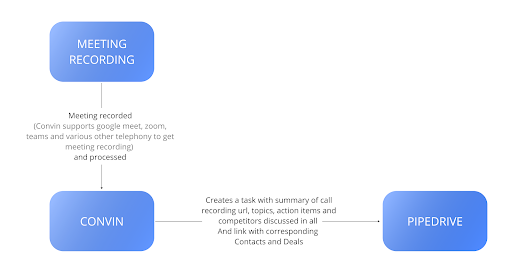
Let’s understand how Callveriq’s native integrations work through this simple example of Pipedrive CRM and Callveriq integration:
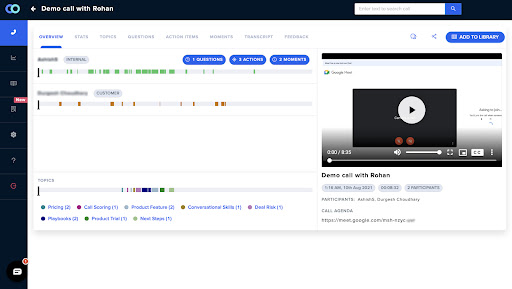
1. On completion of the call, a task is automatically logged in the integrated tool against the respective lead, contact, account, and opportunity record.
2. Meanwhile, the call is automatically recorded by Callveriq, which can be utilized by all Callveriq users post-analysis.
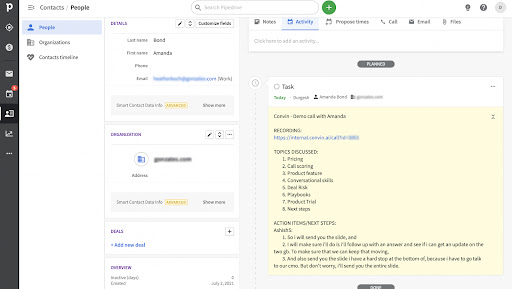
3. While Callveriq automatically pushes a completed task to the appropriate Pipedrive account, the following data points are included:
- Recorded call link
- Topics Discussed
- Action items/Next Steps
- Competitor discussed
- The overall sentiment of customers
- And a lot more…
4. Before joining the meeting, an agent may create a task in Pipedrive. This generates two possibilities that can be chosen during the onboarding phase -
- A new task is created with all the data points from Callveriq.
- The original task will get updated with Callveriq’s data.
Telephony
1. Depending on the telephony system, the tool will use one of the two methods to fetch data/recording from the client:
- Poling call log APIs of telephony
- Webhook/push endpoint, which can be registered with telephony.
2. The call is automatically recorded by Callveriq, which can be utilized by all Callveriq users post-analysis.
Other Integrations
1. There are several other tools that are frequently used in contact centers that can including calendar, video conferencing, and team messaging.
2. As a part of the native integrations, Callveriq makes it super easy to integrate these tools into your system.
P.S. Keep an eye out for Callveriq's assistant in your next video call and watch the magic happen
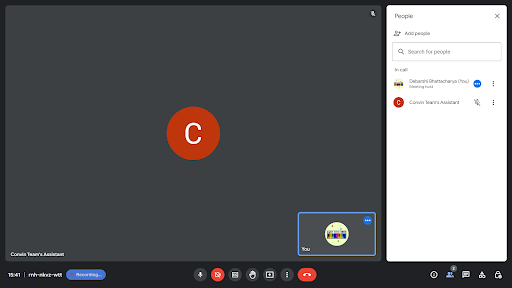
4. As the video conferencing proceeds, the call is automatically recorded by Callveriq, which can be utilized by all Callveriq users post-analysis.
Note: Similar to native integrations, Callveriq also integrates with any other tools that might not be on our list. Couldn’t find your integration requirement on our native list? Mention it to us, and we will make it happen.
Steps For Custom Integration With Callveriq’s Call Center Software
Let’s take a tour around the steps to kick-start integration with Callveriq:
For example, Let’s consider a tool named X,
1. Log into the Callveriq Dashboard.
2. Go to the ‘Settings’ section on the left panel.
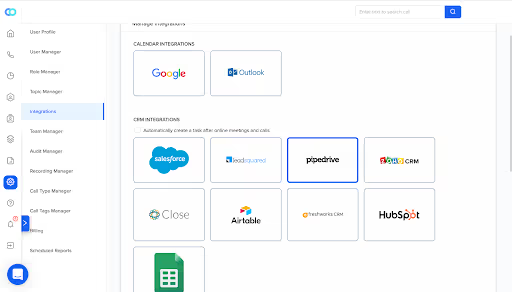
3. Then go to ‘Integrations’ and look for ‘X.
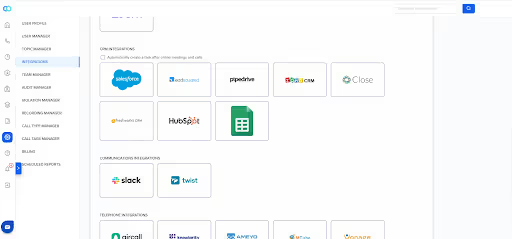
4. Click ‘Connect’ on X Integration.
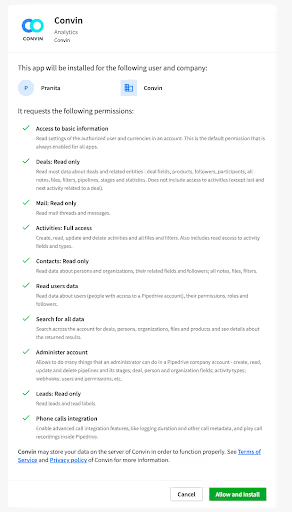
5. You’ll now be redirected to the permissions page on the X dashboard.
6. Click on ‘Allow and install,’ and your job is done.
7. In case you want to disconnect the Integration. Go to the Integrations page and click ‘Disconnect.’
If you have trouble setting this up for your use case, get on a call with us.
How Callveriq Enables Two-Way Integration?
Two-way integration by Callveriq (optional) allows users to exchange data to and fro Callveriq’s software and their tech-stack tools in just two steps.
Let’s discuss how two-way integration works with Callveriq:
1. Callveriq uses the webhook method to process data from the client.
2. With two-way integration, a business can easily receive data from the preferred tool and, at the same time, fetch information from Callveriq to their preferred tech-stack
3. Two-way integration opens doors to getting access to various information in their tech-stack. Here are some live examples of information flow with two-way integration with a client in healthtech using Callveriq’s contact center software -
- AI scores
- Call links
- Action items
- Key points discussed on call
- Talk ratio
- Interruption
- Meet link
- Individual parameter response
Talk To Us
Callveriq, being the conversation intelligence hubspot for call centers, aims at making integrations as seamless as possible, and with the right support, we are improving every day.
What could be better than integrations fetching you the best business insights that help you grow and scale your company?
Callveriq’s objective is to 3X your call center performance–Automate your call center using Callveriq’s 100% call QA, boost agent performance and reduce ramp-up time by 60% with automated coaching, and predict your customer’s ifs and hows using customer intelligence.
We would love to help you get the best service without any hiccups.